Procolored F13X: price, specifications and F13 comparison
The Procolored F13X is an A3 garment DTF printer aimed at apparel production. Its launch offer may catch your attention, but the useful buying question is whether the complete setup fits your orders, computer and budget.
This is a researched launch analysis; we have not tested the machine.
Affiliate links: we may earn a commission on qualifying purchases. See our link policy.
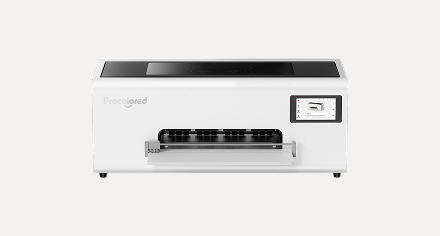
Procolored F13X price: historical launch offer
Procolored’s partner announcement lists a $100 machine discount for new customers and $200 for existing Procolored machine buyers. The resulting machine prices are $2,899 and $2,799 respectively. Add the pass to understand what you would actually spend.
| Buyer | Machine | Pass | Combined cost |
|---|---|---|---|
| New customer | $2,899 | $9.99 | $2,908.99 |
| Existing Procolored machine buyer | $2,799 | $9.99 | $2,808.99 |
| Without the pass | $2,999 | — | $2,999 |
These totals exclude shipping and taxes. Confirm your eligibility and destination-specific checkout price.
The $9.99 payment buys a non-refundable pass. It is additional to the machine price and is not credited toward it.
Consumables and purchase dates
The announcement also promises a standard consumables kit plus six extra DTF ink sets, with a manufacturer-stated value of $1,030. Treat that as supplies you may use, rather than money returned to your account.
- Qualifying machine payments: 15 October–14 November 2026 (Pacific Time).
- Extra ink vouchers: emailed within 14 business days of confirmed delivery.
- Estimated dispatch after payment: US 30 business days; Europe 45, excluding transit.
Buyer discounts cannot be combined. The general KARLMURPHY coupon’s compatibility with this offer is unconfirmed. Check the official F13X campaign terms before paying.
Our buying view: value the extra supplies against your own usage forecast. Someone printing occasionally may benefit less than a shop with repeat orders. Ask about voucher expiry, redemption shipping and which supplies are included before counting their full advertised value as a saving.
Procolored F13X vs F13: the published differences
These are manufacturer specifications, not an independent performance test. The comparison is with the standard F13, not the F13 Pro.
| Specification | F13X | Standard F13 |
|---|---|---|
| Printheads | Two | Single L1800 |
| A4/Letter output claim | 27 prints/hour | 6 prints/hour |
| Computer support | Windows and macOS | Windows |
| Software dongle | Not required | Required |
| Nozzle checking | Camera-assisted | Manual inspection |
| Standby moisturizing | Automatic | Manual |
Sources: F13X launch specifications and standard F13 specifications, checked 15 September 2026. Both are affiliate links.
What does the speed claim mean for a T-shirt business?
A printer’s quoted output is only one stage of production. Before paying extra for speed, ask for a timed run using your artwork, print size and chosen quality setting. Include file preparation, maintenance interruptions, curing, pressing and rejects in the demonstration.
Our assessment: faster printing is useful when printing is the stage holding up paid orders. If artwork approval, pressing or packing already takes most of your day, a faster printer may leave that constraint unchanged. Compare finished, acceptable garments per working hour, not just film leaving the machine.
Does Mac support change the decision?
For a Mac-based studio, computer compatibility deserves its own demonstration. Ask Procolored to confirm your macOS version, processor and supplied software licence. Have them show importing artwork, preparing the white layer and sending a job from the same type of computer you use.
What else do you need for garment DTF printing?
A complete DTF workflow prints a design onto film, applies adhesive powder, cures it, and transfers it onto a garment with a heat press. Brother’s direct-to-film process guide documents these stages and explains that materials affect curing and peeling instructions. It is general process background, not an F13X setup manual.
Request an itemised quote for your printer, suitable curing equipment, heat press, consumables and software. Include workspace and extraction requirements specified by the equipment and consumables suppliers. Ask which parts of that setup come with your selected bundle.
Before offering a product for sale, test your chosen transfer on the actual blank. Judge the fine detail, feel and durability against the standard you promise customers. A convincing sample on one fabric does not establish the result on every garment in your catalogue.
If you are choosing between clothing and hard-object decoration, start with our DTF vs UV-DTF guide. Our UV-DTF printer collection covers the separate hard-goods workflow.
Is the F13X a suitable DTF printer for a small business?
Build the decision around orders you can reasonably fulfil and sell. Start with your recent sales or a small paid trial. A larger production capacity has little financial value if it sits unused, while reliable repeat work makes it easier to evaluate an equipment purchase.
Keep two budgets: the initial setup, and the cost of each saleable order. The second should include the blank garment, ink, film, powder, packaging, payment fees, labour and expected waste. Add maintenance and other recurring costs to your monthly budget.
A simple ownership-versus-outsourcing example
Illustration only: suppose owning a complete setup costs $4,000, and producing a transfer yourself saves $2 compared with buying it from a supplier, after variable production costs and labour. You would need 2,000 saleable transfers to recover that setup cost before additional fixed expenses. At 100 transfers per month, that is 20 months; at 400, it is five.
Those figures are deliberately hypothetical, not F13X running costs or an earnings forecast. Replace them with written equipment quotes, sample-job consumption and your own labour rate. Include maintenance and downtime before deciding whether buying now makes more sense than outsourcing.
The consumables promotion may lower early cash spending, but your long-term model should use replacement supply prices. Avoid building a business that only works while introductory ink is available.
Maintenance, warranty and support questions
Procolored’s general warranty policy distinguishes printheads from other components and places conditions on ink-related coverage. It also says returns are unavailable after ink is added. Confirm the F13X-specific terms and any applicable local rights before filling the machine.
Ask for the exact printhead part number, replacement price, maintenance schedule and the process for getting support in your country. Request confirmation of who pays replacement-part shipping and whether a problem is diagnosed remotely or handled by a local technician.
Our assessment: automatic maintenance features are a reason to request a demonstration, not a reason to omit maintenance time from your budget. Ask what happens after a quiet week and what the operator must do before the next paid job.
Who should consider the Procolored F13X?
Worth shortlisting: an apparel seller with repeat orders, an itemised setup budget and enough time to learn the process. A current F13 owner should identify the specific limitation they want to solve and ask the F13X demonstration to address it.
Consider waiting or outsourcing first: a new seller still testing demand, someone needing confirmed delivery for an imminent order, or a buyer unable to confirm software and local support. Keeping production outsourced during a sales trial gives you real order data to use in the purchase decision.
The F13X deserves a close look, but our recommendation is to buy against demonstrated fit, a complete quote and clear support terms. The deposit deadline alone is not a sufficient reason to choose a printer.
Procolored F13X questions answered
Is this a hands-on Procolored F13X review?
No. This article evaluates published specifications, launch terms and buying considerations. We have not measured print quality, reliability or running costs ourselves.
Does the quoted machine price include a complete business setup?
Use the price table as a starting point. Request a written bundle list and a total delivered quote, including the equipment needed to cure and press your transfers.
Can I use the same settings as another DTF printer?
Use instructions for the exact printer and materials you purchase. Brother’s process guide notes that curing times, temperatures and peeling methods can vary between consumables.
Should an F13 owner upgrade immediately?
Compare the cost of upgrading with the limitation in your current workflow. If the F13 already fulfils your orders on time, collect a representative F13X demonstration and a complete quote before replacing it.
Research and current availability
Research updated 15 September 2026 using Procolored’s F13X campaign, standard F13 specifications, warranty policy, the supplied partner announcement and Brother’s DTF process guide. Each source is linked beside the relevant discussion. Prices and terms can change.
Specifications and output figures remain manufacturer claims. The workflow assessments and cost illustration are our analysis. We have not independently verified durability, operating costs or the campaign’s consumables valuation.
Affiliate link: we may earn a commission on qualifying purchases.